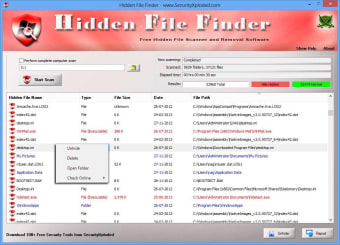
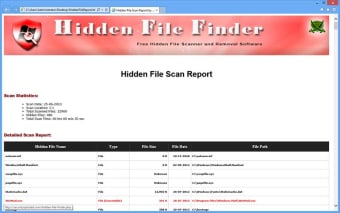
Hidden File Finder is a free Security and Privacy software by SecurityXploded. The software can scan and discover every hidden file encrypted in a computer’s local library. It executes parallel multithreading scan for acquiring every hidden file in the computer. Users can detect hidden executable files like EXE, DLL, and COM. This software provides color coding: it uses red for executable files, black for hidden files and blue for hidden folders. are shown in blue color. The software has Unhide Operation where users can select every discovered hidden file and make them available for viewing via Unhide. Uncovered files are in green color while the failed batches are in yellow.
Hidden File Finder is the free software to quickly scan and discover all the Hidden files on your Windows system.
It performs swift multi threaded scan of all the folders parallely and quickly uncovers all the hidden files. It automatically detects the Hidden Executable Files (EXE, DLL, COM etc) and shows them in red color for easier identification. Similarly 'Hidden Files' are shown in black color and 'Hiddden Folders' are shown in blue color.
One of its main feature is the Unhide Operation. You can select one or all of the discovered Hidden files and Unhide them with just a click. Successful 'Unhide operations' are shown in green background color while failed ones are shown in yellow background.
Hidden File Finder works on both 32-bit & 64-bit platforms starting from Windows XP to Windows 8.
Laws concerning the use of this software vary from country to country. We do not encourage or condone the use of this program if it is in violation of these laws. Softonic may receive a referral fee if you click or buy any of the products featured here.